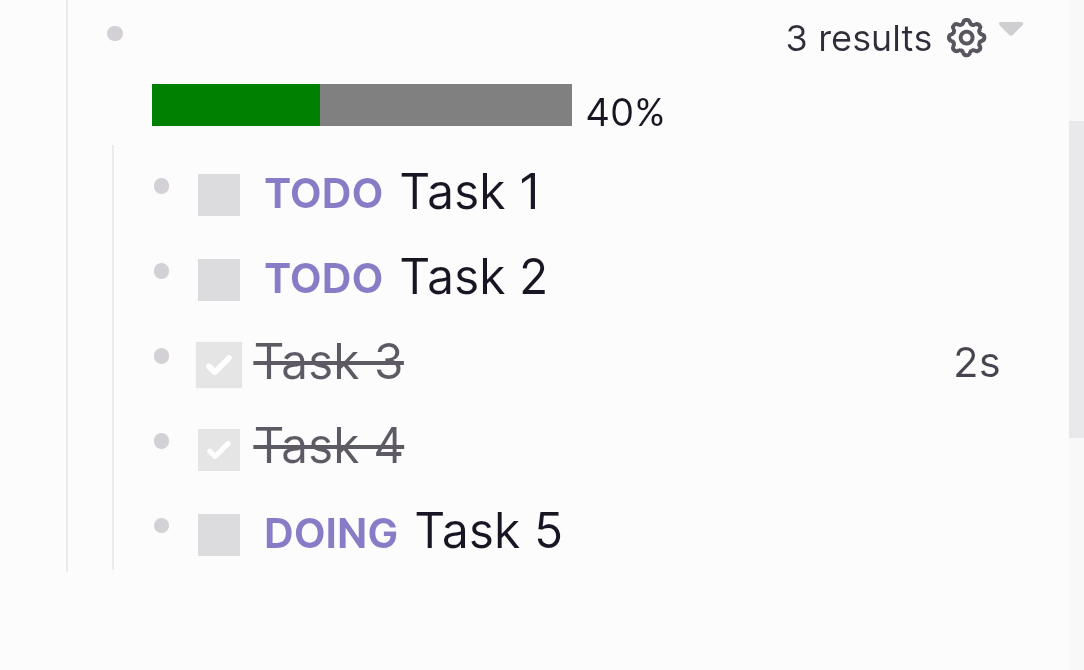
Progress bar for tasks in logseq
Using advanced queries to display a progress bar for tasks in current block based on their completion status.20260101
I am using Logseq to take notes and keep track of certain things. I'm far from using it daily and to the full extent of its capabilities, but from time to time I come back to it. I try to stick to one tool, because I have spent some time configuring it. For example I have it setup so that I can sync my graph between mobile and desktop. Recently I looked at orgmode for emacs, and found the task management interesting. It is for example possible to add the percentage of completition of the tasks under a heading. Instead of 'PKM-hopping', I tried to implement this in logseq. Online I found this plugin by pengx17 which seems to be exactly what I'm looking for. The only problem is that as of writing plugins are not supported on the mobile apps of logseq.
Ingredients
I quickly found out that it's quite easy to display a progress bar in logseq with [:progress {:max 10 :value 3}]. However you would have to manually update the values to update the progress bar, so not ideal. I would like the value of :max to dynamically be the total number of task in the block, and for :value the amount of tasks that are done. To achieve this, I needed to learn more about advanced queries in logseq.
As per the docs "Advanced queries are written with Datalog and query the Datascript database." I had never heard of either. Moreover, logseq seems to be using datalog through clojure (not exactly sure how it is setup). But I tried to make my own. An advanced query in logseq always starts with #+BEGIN_QUERY and ends with #+END_QUERY. Then there are two parts of a query that we need to adapt: the query itself and the view part, which determines how the query will be displayed. The plan is to write a query that will get the total amount of tasks and the amount of tasks that are done for the current block, and to display this information in the progress bar element displayed above.
The query
After quite some frustration, not helped by the fact that I thought I could do this quickly on my phone, I managed to get a query that gets the number of tasks per marker (the status of the task, like TODO, DOING, DONE).
{
:inputs [:current-block]
:query [
:find ?status (count ?task)
:keys status task
:in $ ?current-block
:where
[?task :block/parent ?current-block]
[?task :block/marker ?status]
]
}
#+END_QUERY
which will return something like:
{status:"DONE",task:2},{status:"TODO",task:3}
We start the query by making use of the special value :current-block provided by logseq as our input. We then need to process the inputs at the :in line so the id of the current block gets assigned to the variable ?current-block. The $ represents the database. The :find line represents the variables we are querying. It's possible to make us of prebuilt functions here like I did with 'count'. Another option would for example be 'pull' to get the block itself. the line :where is where we specify the conditions of our query. in the first line the variable ?task gets assigned the id of the block parent of the current block. on the second line we divide the blocks depending on their marker.
As I am very new to this I found the language a bit confusing and a lot of trial and error was needed for me to get this working. For example I thought I could just define two variables like ?done and ?todo and use the notation (task ?done #{"DONE"}) to assign them the right block, but having two of these statements didn't work, both variables ended up having the same data.
Progress bar
I went back and forth to see if I could do more with the query but my limited knowledge meant this was the best I could do to get the done tasks separated from the rest. So I worked on how the data is displayed. to do this you have to add a :view element after the query. There are a few predefined forms. I relied mostly on the logseq forum for examples, and I could not find the relevant docs.
(let [total (sum(map :task result))]
(let [done (first (for [r result :when (= (:status r) "DONE")](:task r)))]
[:div [:progress {:max total :value done}] " " [:small (* (/ done total) 100)"%"]])
))
We pass the query above to our function as 'result'. Then with let we map the sum of the number of tasks to the variable total. There is a lot of different parentheses and curly or square brackets. It is not yet clear to me what the difference is, so it was mostly trial and error here. But it is important that the scope of the let statement includes the div element, so that the closing parentheses is placed after the div element. the second let statement assign the first element in our result array that has status equal to "DONE" to the variable 'done'. We loop through the entries with a for loop. The third line displays the data. We create a new div that contains a progress bar. We use our variables total and done so that the progress bar updates dynamically. I've also added a small element that displays the completetion percentage.